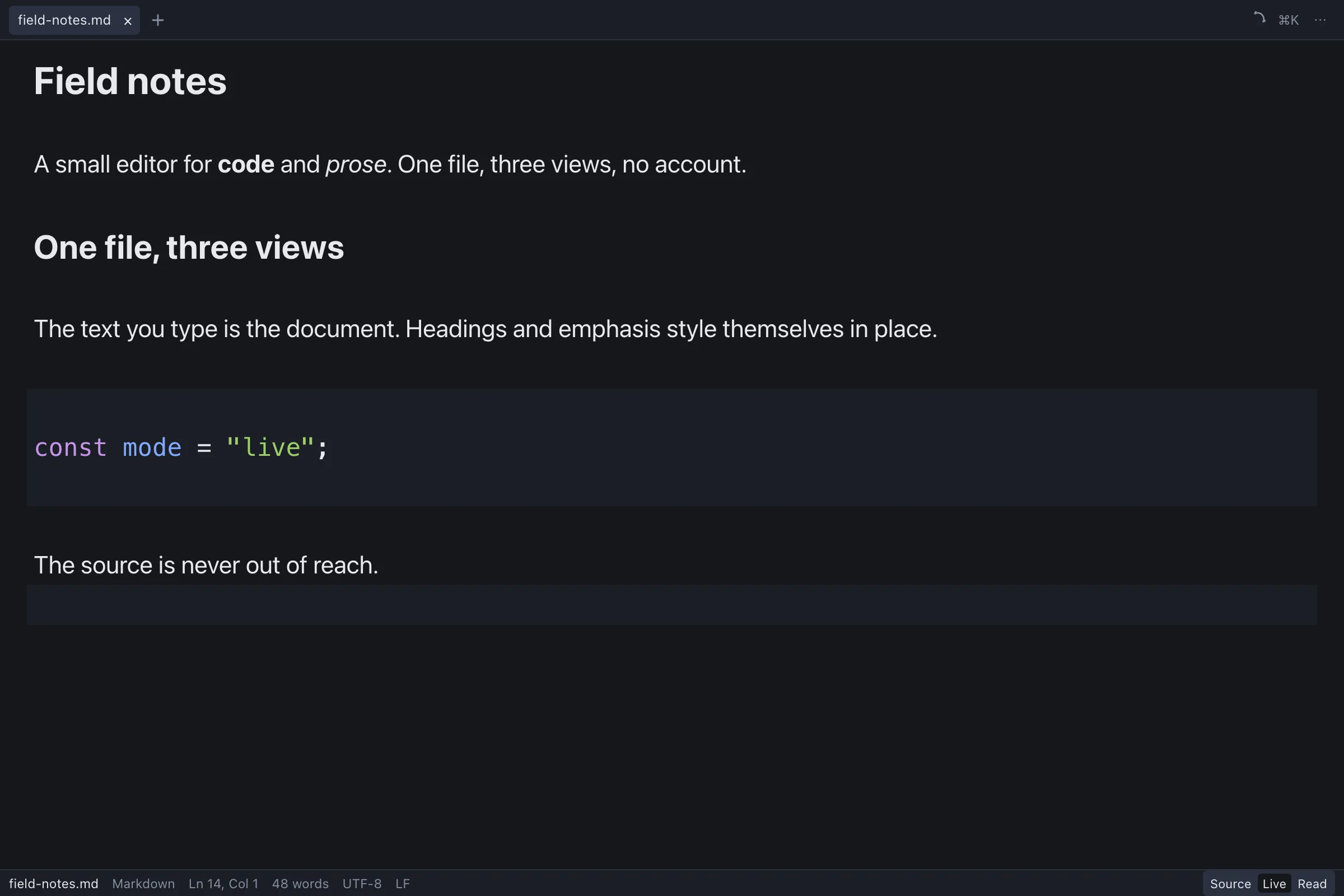

Field notes
One file, three views
A small editor for code and prose. The file stays plain text.
Read more in the field notes.
const mode = "live";The source is never out of reach.
Quillote 0.1.0 · public beta
Live mode styles headings, emphasis, code and links as you type, with the source still in the file. A 5.2 MB universal Mac app, 7.2 MB on Android, and the same three views on iPhone. No account, no telemetry, no browser engine in a trench coat.
5.2 MB universal DMG · Apple Silicon + Intel · macOS 10.13+ · unsigned beta, right-click to open
✳ Local-first by default
✳ No account, ever
✳ Plain text, not a database
✳ macOS · iOS · Android · Windows · Linux
01 Three modes
Switch views without converting anything. The file on disk never changes. The tabs below are live: try them.
# Field notes

A small editor for **code** and *prose*.
The file stays plain text.

## One file, three views

Read more in the [field notes](https://quillote.com/notes).

~~~ts
const mode = "live";
~~~

The source is never out of reach.
A small editor for code and prose. The file stays plain text.
Read more in the field notes.
const mode = "live";The source is never out of reach.
Field notes
A small editor for code and prose. The file stays plain text.
Read more in the field notes.
const mode = "live";The source is never out of reach.
Interactive preview. The real app opens your files, not a demo document.
Live mode
This is not a preview pane bolted onto a text box. Live styles the file in the same buffer you are typing in. Headings, emphasis, inline code, links and fenced code settle into place while the Markdown stays underneath. One keystroke takes you back to Source.
Recorded in the real app, at normal typing speed. No cuts, no mockup.
Live mode, typed live. The file is still Markdown.
The file on disk. Markdown goes in, Markdown comes out. No database, no conversion, no format only Quillote can read.
02 The file
No database. No proprietary document. Every note is a file you can open in any editor, forever. Quillote is a view over your disk, not a new home for your words.
Follow the build on GitHub.md, .txt, source code. Nothing leaves the file system, and nothing gets rewritten into a format only we can read.
Syntax highlighting is detected from the file name, shebang or modeline. Each language is a lazy chunk, so the first file opens fast.
Source, Live and Read share the same text. Code files stay in Source, where they belong. Markdown gets the full set.
Read mode handles real tables and KaTeX math, and loads KaTeX only when a document needs it. Relative images resolve against the file.
The palette, shortcuts and the 1 / 2 / 3 mode keys keep your hands on the keyboard. The phone gets a formatting bar above the keyboard.
A snapshot every five seconds while the buffer is dirty. Autosave is off on the desktop and on for the phone. You decide what leaves the app.
Print the page, export a PDF on macOS, or copy the rendered article as HTML. The file stays the source of truth.
Night is ink and gold. Ink is warm parchment, not a white page with a blue button. Both are built to sit with the words, not shout over them.
03 Read mode
Read mode turns the file into a quiet article: real tables, math, links and images. The editor stays underneath, one keystroke away.
This is Ink, the light theme. Warm parchment instead of white, amber instead of system blue. The lowest text pair measures 4.88:1.
Field notes · 23 October 2026
The best tool is the one you forget you are using. Quillote stays close to the file: no database, no lock-in, no account asking for your email before you can type a sentence.
Write in Markdown or in plain prose. Switch to Live to see the formatting settle in place. Switch to Read when you want the page to feel like a page.
| View | What it shows |
|---|---|
| Source | The file, markdown and all |
| Live | Formatting in place, markers hidden |
| Read | A clean article, tables and math |
E = mc2
Write in the same file you ship.
The light theme, in its natural habitat. Same file, no conversion.
04 Speed
These are hard gates in the build, not launch-day claims. The app uses the system webview instead of bundling Chromium, and the Rust release profile is tuned for size.
| Quillote | Typical Electron note app | |
|---|---|---|
| Installer | 5.2 MB | 85 to 190 MB |
| Cold start | 500 ms budget | Seconds |
| Mobile | iPhone and Android | Rare |
| Runtime | System webview + Rust | Bundled Chromium |
| Your files | Plain text on disk | Varies, often a database |
| Telemetry | None | Varies |
Category ranges come from our October 2026 stack research. Quillote numbers are measured from the current build.
05 Platforms
Tauri 2 shell, CodeMirror 6 core, vanilla TypeScript, a small Rust backend. The same file, the same modes, at a desk or in a pocket.
Universal beta, 5.2 MB DMG for Apple Silicon and Intel. Unsigned for now; right-click and Open the first time.
Download the DMGNative iOS shell with the same three views, the formatting bar above the keyboard, and files copied into the app sandbox.
TestFlight next7.2 MB signed APK. Android ignores extension filters in the picker, so Quillote checks the file name before it copies anything.
Download the APKThe same Tauri app and WebView2. CI-built NSIS and MSI installers, 2.1 MB and 2.6 MB, are attached to the GitHub release; they are unsigned for now.
Get the installerWebKitGTK 4.1. CI builds a .deb and an .rpm from the same source and attaches them to the GitHub release. The AppImage is not shipped: bundling WebKitGTK pushed it to 82 MB, over the 10 MB budget.
Get a package06 Answers
Short answers, no sales voice. If yours is missing, the support page has more.
Quillote is a small code and Markdown editor for macOS, iPhone and Android. It has three views: Source, Live and Read. It is built for people who keep their work in files, not in someone else's database.
The public beta is free. Pricing for the 1.0 release has not been decided. If a paid tier arrives, the local editor stays usable without an account.
Yes. Quillote opens files on your disk and needs no connection. A link you click opens in your browser.
No. There are no accounts, no analytics and no telemetry. The app does not check for updates in this beta. The only network request is a link you choose to open.
Both. Markdown gets Source, Live and Read. Code files get Source, with syntax highlighting for around 100 languages, line numbers and a lazy-loaded grammar per language.
Yes. The iPhone and Android apps are in beta. The Android APK is signed and downloadable below; iPhone goes through TestFlight and the App Store. On mobile, a file you open copies into the app sandbox; edits leave through the share sheet. That is deliberate, because writing back to a picked provider URL is not reliable yet.
Read mode renders tables and KaTeX math. Live mode styles headings, emphasis, code and links; tables and math stay as source, so nothing is hidden from the file. KaTeX loads only when a document needs it.
It uses the system webview instead of bundling Chromium, ships no UI or editor fonts, and builds Rust with LTO, one codegen unit, stripping and panic=abort. The size budgets run in CI.
Not yet. The public beta DMG is unsigned, so right-click the app and choose Open the first time. Signing and notarization are the next release step.
The same codebase builds on Windows and Linux. CI-built installers are attached to the GitHub release; they are unsigned for now. Windows users will see SmartScreen until a code-signing certificate is added.
07 Download
The macOS beta is a 5.2 MB universal DMG. Open it, drag Quillote to Applications, and write something. Android users can install the signed 7.2 MB APK. No sign-up, no onboarding flow, no sample document pretending to be yours.
Unsigned beta · Universal (Apple Silicon + Intel) · macOS 10.13+ · right-click Open the first time
DMG SHA-256 185c2304af31ee032a6397316e05d6141f19e7db7063f0cd6a1431f6198384a7
APK SHA-256 5c06b0cef231c5e87bb20f1cc36e68711a2af3ccbae6ddbc8075382dccf13272